App manual
Setting Your Three Reminder Times
The app nudges you three times a day. Those three times start on sensible defaults and are meant to be changed, because the right time for a session is the one you can actually keep.
Where they live
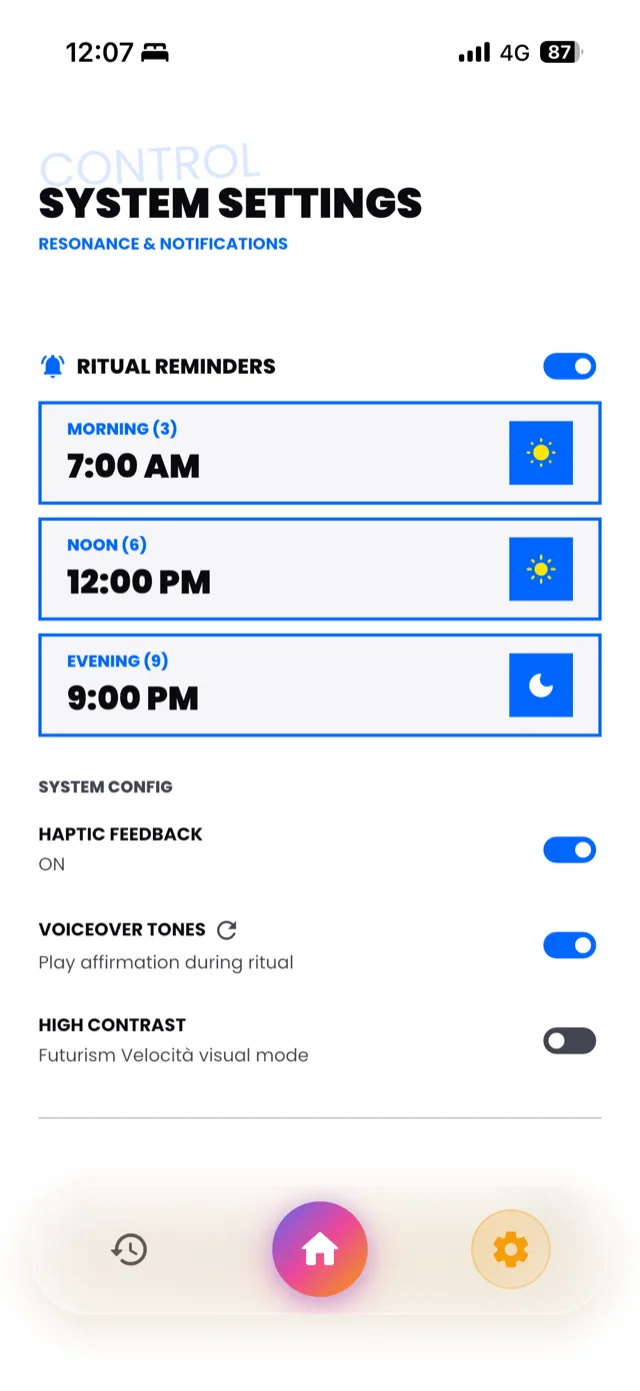
The three time cards, each labelled with its repetition count: Morning (3), Noon (6), Evening (9).
Open the settings screen, headed CONTROL. The first block is RITUAL REMINDERS, with a toggle beside it and three time cards underneath, each labelled with the number of repetitions it asks for: Morning (3), Noon (6) and Evening (9).
The toggle turns all three on and off together. The cards set the times individually. Tapping a card opens a time picker; choose your time and the app reschedules that notification straight away, without needing a save button or a restart.
Defaults are 7:00 AM, 12:00 PM and 9:00 PM.
Choosing times that hold
A reminder is only useful if it lands when you can act on it. Some things worth knowing before you set them:
- Anchor to something fixed, not to a number that looks neat. After you put the kettle on, before you leave for work, once you are in bed. A time that sits beside a habit you already have will survive far longer than a round number.
- Leave room between them. Each session opens for a limited window, thirty minutes by default. Times set too close together can overlap awkwardly.
- Do not set the night one for when you are already asleep. Nine repetitions is the longest of the three. Give it a slot where you are still awake enough to mean them.
Changing a time does not affect your streak or anything you have already completed.
When notifications stop arriving
Work through these in order:
- Check the RITUAL REMINDERS toggle is on. If it was switched off, nothing is scheduled.
- Check iOS permission. Open the Settings app on your phone, find 369, and confirm notifications are allowed. If you declined the prompt when you first installed the app, this is where you reverse it. The app cannot ask again on its own.
- Check Focus and Do Not Disturb. A Focus mode running at your session time will hold the notification back. Add 369 to the allowed list for that Focus, or move the session time outside it.
- Check your time zone. Reminders are scheduled against the time zone the app has stored for you. If you have travelled, open the app once on arrival so it can catch up.
- Open the app. iOS deprioritises notifications from apps that have not been opened in a long time. Opening it once is usually enough to restore normal delivery.
Reminders are not the practice
One honest caveat. A notification is a prompt, not a habit. If you find yourself dismissing all three every day without opening them, the answer is not more reminders or louder ones. It is usually a sign that the times are wrong, or that the intention you are writing has stopped meaning anything to you.
If it is the second, Changing Your Intention is the page you want.